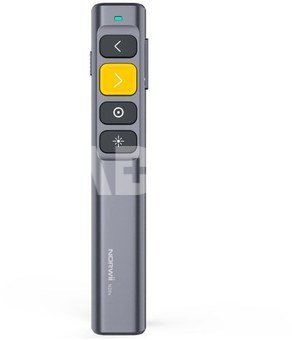
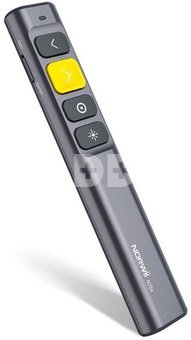
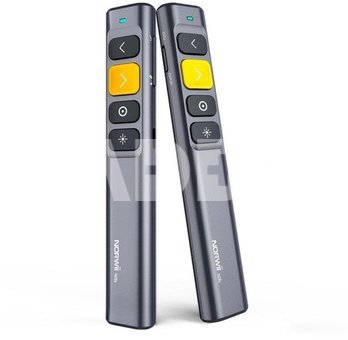
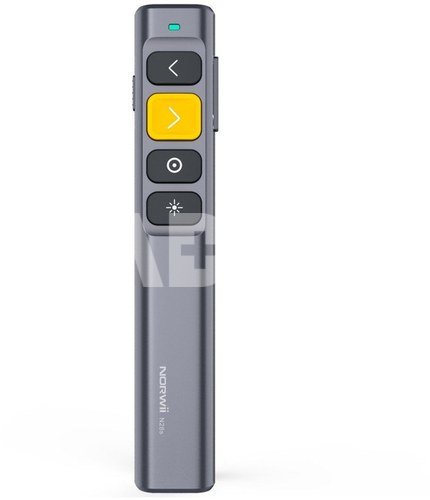
Remote control with laser pointer for multimedia presentations Norwii N28s
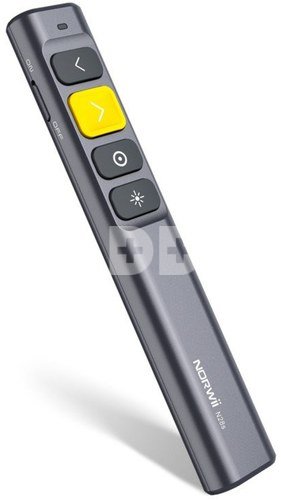
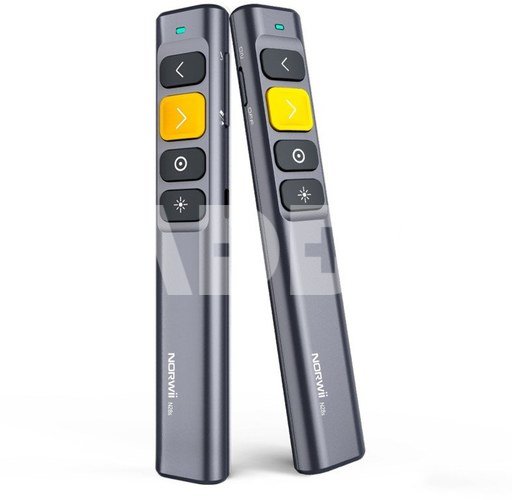
Norwii N28s laser pointer remote control is an innovative tool that will give you perfect control over your multimedia presentations. With a communication range of 50 meters, you can move freely around the room, highlighting important elements on the screen. The device can also act as a mouse. It also supports such options as highlighting, zooming and drawing. The remote control will allow you to conveniently control many programs (including PowerPoint, Keynote, Prezi and Google Slides). The included USB-A receiver offers 32 GB of space for your data. The rechargeable battery, USB-C port and ergonomic buttons provide maximum comfort and functionality. Regardless of the size of your auditorium or conference room, this remote control will help you make an even better impression on your audience! Main Product Features universal remote control for multimedia presentations 50 meter communication range embedded laser pointer with a range of 200 meters can act as a mouse (control the cursor on the computer screen) ideal choice when you present content on LED or LCD screen (virtual pointer displayed on the screen) support for content highlighting, zooming or drawing functions on the screen button for volume control the USB receiver has 32 GB of internal memory (can act as a flash drive) compatibility with systems: Windows, macOS, Android, Linux convenient control of multimedia presentations, without having to go to the computer support for many computer programs, including PowerPoint, Keynote, Prezi, Google Slides, Pages, Word, Excel, OneNote, Numbers, ACD See three slide change modes tailored to different programs possibility to personalize the buttons with the free Norwii Presenter app (Windows / macOS) in the receiver's memory 2 installation files of the Norwii Presenter program (.dmg and .exe) "Plug and Play" - no need to download and install additional drivers physical "ON / OFF" switch to minimize accidental shutdown of the device USB-A compatible receiver special magnetic receiver box located on the remote control housing built-in rechargeable battery and convenient charging via USB-C port full charging of the remote control takes up to 2 h 2 weeks of regular use on a full charge standby mode for maximum power saving ultralightweight, minimalist style and modern design LED light to indicate operation and inform of a discharging battery easy and intuitive operation included USB-C / USB-A cable and a case (pouch) made of pleasant to the touch material New quality of your speeches Norwii N28s remote control with laser pointer for multimedia presentations is a tool that will make your speeches even better. With it, you don't have to go to the computer every time you want to change a slide. You can give multimedia presentations, delighting your audience and focusing on what's most important - imparting knowledge, inspiring and evoking positive emotions. Whether you're at a conference, school or business meeting, Norwii N28s will help you capture your audience's attention, highlight the most important information and share your knowledge effectively. Built-in laser pointer The Norwii N28s remote control is not just about controlling slides. The built-in laser pointer allows you to precisely highlight important elements on the screen. Whether you're giving a motivational lecture, a lesson or a training session, this tool is sure to make your job easier. Use it to highlight key points in your presentation from up to 200 meters away. Move the cursor as you would with a mouse Norwii N28s multimedia presentation remote control allows you to move the cursor on the screen as easily and precisely as with a mouse. The device works like a magic wand - when you activate the motion sensor, you simply move it in the air and the arrow changes its position. Thus, the Norwii N28s allows you not only to navigate smoothly between slides, but also to move freely throughout your computer workspace. The remote also supports the functions of highlighting content, erasing, zooming or drawing on the screen. You won't need a traditional mouse during the speech! Suitable for LCD or LED screens When you want to show something on an LCD or LED screen, a laser pointer may not be visible enough. With help come digital pointers that turn the cursor into a distinctive red dot. Norwii's N28s multimedia presentation remote control is compatible with the kind of virtual solutions that slideshow software offers. This will make your content presentation just as impressive, whether you use a projector or a large screen. 50 meter range The range of the Norwii N28s wireless remote control is an impressive 50 meters. Together with it, you can move freely around the room or auditorium with full control over your presentation. Whether you are conducting a meeting in a small room or on a larger stage, this remote control will enable you to change slides comfortably. Choose the Norwii N28s and enjoy unprecedented freedom when displaying multimedia presentations. Wide compatibility Looking for a device that won't let you down when you hit a different slide display software than the one you use every day? The Norwii N28s remote control is compatible with most computers equipped with a traditional USB Type-A port. It can be used with both Windows, macOS, Android and Linux operating systems. It supports such computer programs as PowerPoint, Keynote, Prezi, Google Slides, Pages, Word, Excel, OneNote, Numbers, ACD See and various virtual galleries (such as Photos from Apple). Thanks to "Plug and Play" technology, the device does not require downloading additional drivers. Receiver you won't lose The receiver, which needs to be connected to the device from which your presentation will be displayed, with its dimensions resembles a small flash drive, so it is easy to lose it. Fortunately, the manufacturer has provided solutions that minimize this risk. The Norwii N28s remote control is equipped with a small cache for the receiver. A strong magnet will ensure that until you decide to remove it, it will definitely stay in place. Portable drive with 32GB capacity The USB-A receiver included with the Norwii N28s remote control offers 32 GB of built-in memory. You can store and keep all your presentations and important documents on hand at all times on this unique pendrive. Right out of the box, you'll find Norwii Presenter installation files on it for both Windows and macOS. An arrow is unequal to an arrow It doesn't matter what computer programs you use for your presentations. The Norwii N28s remote control offers up to three different modes for changing slides, which are adapted to various popular tools. The default functions of the ">" and " " and " Loudness control An integral part of your presentation is sound and musical instrumentation? The Norwii N28s remote control will be an invaluable support in this field as well. The device is equipped with a special volume button. Just hold it down and move the controller up or down to make it louder or quieter. This allows you to adjust the sound to your needs and the conditions in the room in seconds. Whether you want to highlight important moments in your presentation, demonstrate audio effects, or simply provide your audience with audio clarity, now you can do it in one simple motion. Personalization via app Despite access to 3 arrow control modes, there are applications that require special keyboard shortcuts, such as play, pause, or next or previous track. With personalized settings, you can assign any action to any button on the remote control. To customize the controller, just reach for the free Norwii Presenter app, which is available for Windows, iOS and Android. Built-in battery Hidden inside the ultra-light Norwii N28s remote control is a 300 mAh lithium-polymer battery. You can easily charge it using the popular USB-C port. When the device is already on the verge of running out, a special LED will blink red. This added convenience will help you avoid situations where you find out a few minutes before a presentation that the remote control is not ready for use. Accidental shutdown? Not this time! Public speaking can raise the pressure. Trying to control stage fright, we often make nervous gestures. It's then easy to accidentally click something on the remote control and accidentally shut down the presentation. Fortunately, not with the Norvia N28s model. Thanks to the physical "ON / OFF" switch, it will be more difficult for you to accidentally turn off the device. It also minimizes the risk of triggering the remote when you carry it in your bag or backpack. Standby mode With its standby mode, the Norwii N28s multimedia presentation laser pointer remote control guarantees maximum energy savings. After each use of the selected button, the remote control automatically enters sleep mode. The response time for pressing again is less than 1 millisecond! What does this mean? That you would never have realized that the device offers a standby mode if not for this description! The response of the remote control is instant, and you can enjoy a charged battery for longer. Compatibility: devices: equipped with a female USB-A port operating systems: Windows, macOS, Android, Linux software: PowerPoint, Keynote, Prezi, Google Slides, Pages, Word, Excel, OneNote, Numbers, ACD See, photo galleries and more Specification model: Norwii N28s communication: 2.4 Ghz radio receiver communication range: 50 m power supply: built-in rechargeable battery (300 mAh) charging the pointer: USB-C port type of pointer: laser laser beam color: red laser range: > 200 m internal memory: 32 GB (receiver works like a flash drive) dimensions: 144 x 24 x 14 mm weight: 36 g Kit contents Pilot with Norwii N28s laser pointer USB-A receiver USB-A / USB-C cable case
Discuss with a consultant in Kaunas
We don't have
Klaipėda Address: Birželio 23-iosios g. 23g Working hours: I-V 09:00 - 18:00 VI-VII not working Phone: +370 674 59488
Discuss with a consultant in Klaipėda
We don't have
Klaipėda Address: Taikos pr. 17 Working hours: I-V 10:00 - 19:00 VI 10:00 - 14:00 VII not working Phone: +370 604 43972
1. How can a remote control improve the photography experience?
Remote controls provide photographers with more flexibility and control during the photography process. They allow remote functions such as video recording and help prevent camera movement, ensuring stability and the best framing. This is especially useful when taking selfies, group photos, or shooting from a distance. The remote control is particularly beneficial when photographing groups or yourself, allowing you to take pictures without help. It also reduces camera shake, helping avoid blurry images during long exposure times or poor lighting conditions. By using a remote control, you can easily adjust the frame, change settings, and even record videos—all from a comfortable distance. All these factors contribute to a more convenient and creative photography experience.
2. How can a remote control help when shooting with multiple cameras or complex photo compositions?
A remote control is an indispensable tool when shooting with multiple cameras or complex compositions. It allows you to control the camera remotely, enabling the photographer to quickly and conveniently adjust the frame or focus. This is especially useful when creating group or scene photos, where precise control is necessary. Using a remote control reduces camera vibration, ensuring high-quality images. Additionally, the remote control allows the photographer to be more flexible in their creative decisions, making it easier to experiment with different frames. Not only does it save time, but it also enhances the overall photography experience.
















Reviews
0 average rating (0 votes)