
+370 462 46444
I-V 10:00-19:00
VI 10:00-14:00

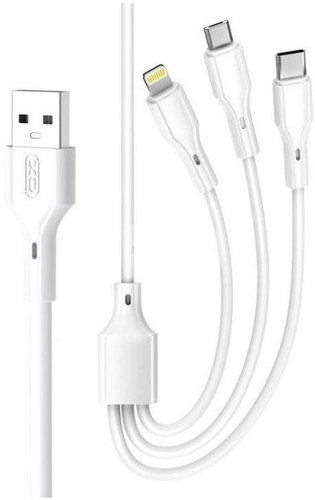
XO cable NB230 3in1 USB - Lightning/USB-C/microUSB 2.4A 1m, white

New product
XO cable NB230 3in1 USB - Lightning/USB-C/microUSB 2.4A 1m, white
Code: 11980NRD
Manufacturer code: -
Add to wishlist
EU warehouse
Delivery 5-10 w.d.
EAN
6920680833511
Choose properties
Color
€9.49
Extended warranty
Product insurance

Pick up for free in the store in Kaunas (Birželios 23-iosios str. 23g) Spalio 05 d.

Pick up for free in Klaipėda, in the store (Taikos pr. 17) Spalio 05 d.

We will deliver to your home via courier service Spalio 07 d.

Turite klausimų? +370 462 46444 Send request

DescriptionXO cable NB230 3in1 USB - Lightning/USB-C/microUSB 2.4A 1m, white description

The XO-NB230 is a 3-in-1 charging cable that allows you to charge devices with different interfaces using a single cable. The cable supports fast charging: when used individually, the microUSB output current is up to 2 A, while the Lightning and USB-C interfaces support up to 2.4 A. When charging multiple devices simultaneously, the cable delivers a total current of up to 3 A.
  • USB-A to USB-C, microUSB, and Lightning cable
  • Maximum current: 3 A
  • Maximum power: 12 W
  • Cable length: 1 m

Delivery time 5-10 w.d.

Discuss with a consultant in Kaunas

We don't have Klaipėda Address: Birželio 23-iosios g. 23g Working hours: I-V 09:00 - 18:00 VI-VII not working Phone: +370 674 59488
Kaunas

Discuss with a consultant in Klaipėda

We don't have Klaipėda Address: Taikos pr. 17 Working hours: I-V 10:00 - 19:00 VI 10:00 - 14:00 VII not working Phone: +370 604 43972
Klaipėda
Specification
Delivery time 5-10 w.d.
Product codes

11980NRD 6920680833511

Reviews

0 average rating (0 votes)

 0
 0
 0
 0
 0

Leave a comment

Only registered users can rate.

Customer reviews (0)

There are no reviews. Be first!

1. How to choose the right cable for your camera or other device?

To choose the right cable for your camera or other device, it is important to consider several factors. First, you need to know what type of connector your device uses – whether it's USB, HDMI, USB Type-C, etc. Next, it’s important to take into account the data transfer speed (the data transfer rate). If it's data transfer, for example, from the camera to the computer, you may need a fast USB 3.0 or USB Type-C connection. Another factor is the cable length – choose the appropriate length depending on where and how you plan to use the cable. The quality of the cables can also impact the stability of the transferred data and the sound quality of the speaker wire. Carefully read the device specifications and choose a cable that suits your needs.

2. How to choose the right power adapter for your electronic device?

When choosing the right power adapter for your electronic device, it is important to pay attention to several key factors. Check the device's specifications to determine the required input voltage, current, and connector. The adapter must meet these specifications to ensure proper charging and prevent potential damage. Choose an adapter from a reliable manufacturer and make sure it meets safety standards. It is also important to pay attention to the type of adapter connector and ensure it is compatible with your device. Finally, consider the portability and convenience of the adapter, especially if you need to charge your device frequently while traveling.