




+370 462 46444
I-V 10:00-19:00
VI 10:00-14:00

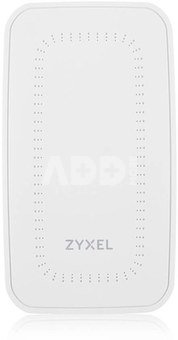
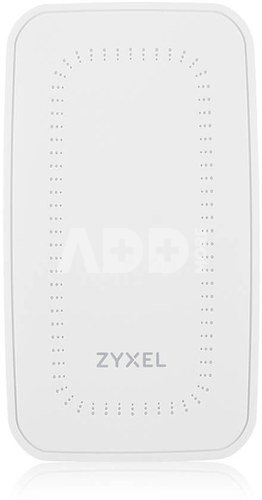
Zyxel Access Point WAX300H-EU0101F

Zyxel Access Point WAX300H-EU0101F
Kodas: 18422ABL
Gamintojo kodas: -
Įsiminti
EU sandėlyje
Pristatymas 11-14 d.d.
Pasirinkite savybes
Spalva
164.00
Nuomoti(nuo €/diena)
Pratęsta garantija
Prekės draudimas

Nemokamai atsiimkite Kaune, parduotuvėje (Birželio 23-iosios g. 23g) Liepos 06 d.

Nemokamai atsiimkite Klaipėdoje, parduotuvėje (Taikos pr. 17) Liepos 06 d.

Pristatysime į namus per kurjerių tarnybą Liepos 08 d.

Turite klausimų? +370 462 46444 Siųskite užklausą

AprašymasZyxel Access Point WAX300H-EU0101F aprašymas

Guaranteed Strong Wi-Fi Connection in Every Corner of Your Hotel Room

Greet every guest with an easy login, and flicker-free Wi-Fi is as important as a warm smile. Designed specifically for hotel rooms, Zyxel WAX300H features the latest Wi-Fi 6 technology to provide excellent performance for guests to connect to the Internet in their rooms.

The AP also supports 160MHz channels, doubling the bandwidth compared to 80MHz channels to support more bandwidth-hungry applications and provide faster speeds.

Outstanding Wi-Fi 6 Performance with 160MHz Channel Support

The AX3000 AP (2x2:2 in 2.4GHz and 5GHz) powered by PoE delivers a maximum data rate of 3000Mbps on 160MHz channels to provide smoother and faster connectivity for hotel guests and in-room services.

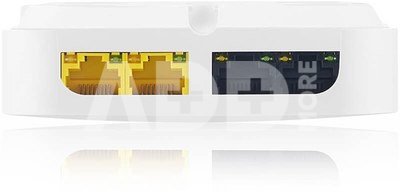
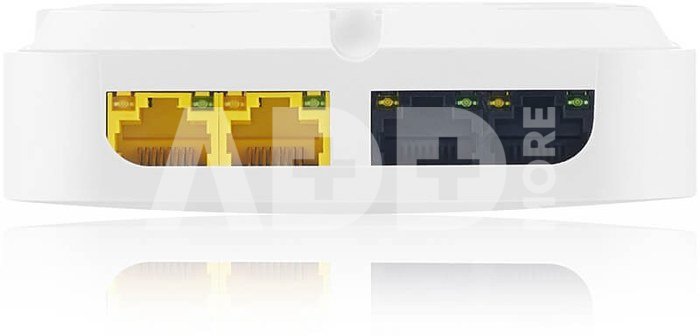
3 Gigabit Downlink Ports for Connecting Devices

3 downlink ports for connecting multiple devices to the network (including one PSE downlink port supporting PoE power (5W) for wired applications when the AP is powered by 802.3at)

Versatile Mounting Options

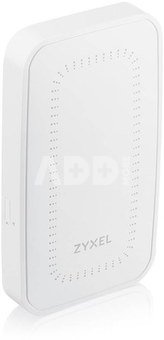
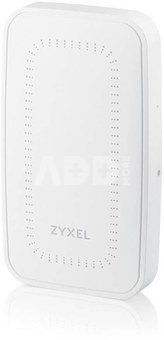
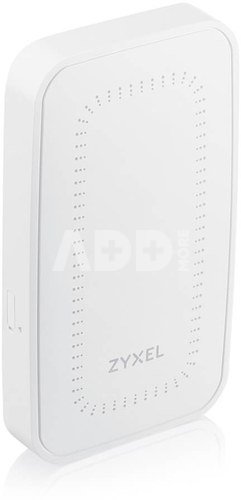
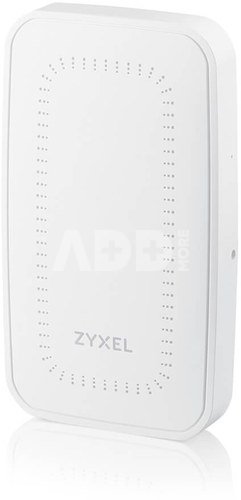
The versatile yet low-profile mounting design allows the AP to blend seamlessly and tastefully into any décor, whether mounted directly on an electrical box, in a remote location, or even simply on a desk.

For Desktop Mounting The ACCESSORY-ZZ0107F is a desktop mount kit that is perfectly compatible with Zyxels WAX300H AP as an additional option.

Flexible Management

NebulaFlex Pro allows users to switch between a standalone local controller or an intuitive Nebula cloud-managed mode as needed.

Extending Modern In-Room Services with a Box

The Zyxel WAX300H is not only a wireless access point but also a switch that can support a wide range of in-room services from wired to wireless without requiring additional power ports.

Four Ethernet ports (1 uplink + 3 downlink) transmit data at Gigabit speeds, allowing multiple devices to connect to the network. One downlink port provides PoE power for wired services such as VoIP phones, minimizing the budget and cabling effort.

Nebula WiFi Aid helps manage and provide the best Wi-Fi user experience

Todays business and leisure travelers expect fast Wi-Fi connections when they enter a hotel and consider Internet connectivity as their top convenience.

Nebula offers hotel IT/network administrators a powerful WiFi Aid tool that provides comprehensive data and insight into guest Wi-Fi connection issues and the ability to more proactively analyze them before guests even complain.

Versatile Mounting Options

The Zyxel WAX300H easily blends into any décor and can be mounted directly on an electrical box or in another hidden location, even on a desk.

For the best aesthetics, the Ethernet cable can be routed out of the cable duct, making the WAX300H slim and easy to fit in tight spaces.

For Desktop Mounting, the ACCESSORY-ZZ0107F is a desktop mount kit that is perfectly compatible with the Zyxel WAX300H Access Point, which is an additional option.

Pristatymo laikas 11-14 d.d.

Aptarkite su konsultantu Kaune

Neturime Kaunas Adresas: Birželio 23-iosios g. 23g Darbo laikas: I-V 09:00 - 18:00 VI-VII nedirba Telefonas: +370 674 59488
Kaunas

Aptarkite su konsultantu Klaipėdoje

Neturime Klaipėda Adresas: Taikos pr. 17 Darbo laikas: I-V 10:00 - 19:00 VI 10:00 - 14:00 VII nedirba Telefonas: +370 604 43972
Klaipėda
Specifikacija
Gamintojas(?) Zyxel
Pristatymo laikas 11-14 d.d.
Prekės kodai

18422ABL 4718937632237

Atsiliepimai

0 vidutinis įvertinimas (0 įvertinimų)

 0
 0
 0
 0
 0

Palikite atsiliepimą

Vertinti gali tik prisijungę vartotojai.

Palikti pirkėjų atsiliepimai (0)

Atsiliepimų kol kas nėra. Būk pirmas!

1. Kaip pasirinkti tinkamą maršrutizatorių namų tinklui?

Norint užtikrinti stabilų ir spartų interneto ryšį, labai svarbu pasirinkti tinkamą maršrutizatorių. Atsižvelkite į tokius veiksnius, kaip maršrutizatoriaus greitis (matuojamas megabitais per sekundę), dažnių juostos (GHz), belaidžio ryšio standartai (pvz., "Wi-Fi 6") ir turimos funkcijos. Taip pat atsižvelkite į savo namų ar biuro dydį, nes tai gali turėti įtakos ryšio kokybei. Saugumas yra svarbus, todėl įsitikinkite, kad maršrutizatorius turi patikimus saugumo protokolus, pavyzdžiui, WPA3 šifravimą. Jei turite daug įrenginių, kuriuos prijungiate prie tinklo, rinkitės maršrutizatorių su daugiajuosčiu palaikymu. Taip pat patikrinkite gamintojo reputaciją ir vartotojų atsiliepimus, kad įsitikintumėte maršrutizatoriaus patikimumu. Svarbu pasirinkti maršrutizatorių, kuris geriausiai atitinka jūsų poreikius ir užtikrina efektyvų tinklo veikimą.

2. Kaip pagerinti belaidžio interneto signalą namuose?

Norint pagerinti belaidžio interneto signalą namuose, galima įgyvendinti keletą priemonių. Pirma, patikrinkite maršrutizatoriaus vietą ir stenkitės jį įrengti kuo arčiau įrenginių, kuriems reikia stipraus ryšio. Pabandykite išvengti kliūčių, tokių kaip sienos arba metaliniai objektai, kurie gali slopinti signalą. Kitas būdas - naudoti stiprintuvą arba pratęsti belaidį tinklą naudojant "Wi-Fi extender" arba "mesh" tinklo sistemą. Patikrinkite maršrutizatoriaus nustatymus ir pasirinkite tinkamus belaidžio ryšio kanalus, kad išvengtumėte trikdžių nuo kitų nešiojamųjų įrenginių arba kaimynų maršrutizatorių. Galų gale, įsitikinkite, kad maršrutizatorius ir visi įrenginiai turi naujausius programinės įrangos atnaujinimus, nes šie atnaujinimai dažnai patobulina signalo stabilumą ir veikimą. Remiantis šiomis priemonėmis, galima ženkliai pagerinti belaidžio interneto signalą ir užtikrinti geresnę ryšio kokybę namuose.










