

+370 462 46444
I-V 10:00-19:00
VI 10:00-14:00

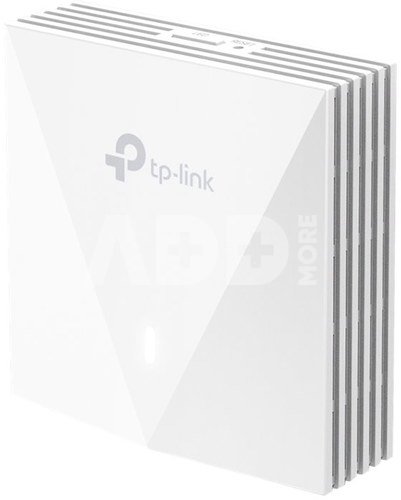
TP-LINK AX3000 Wall Plate WiFi 6 Access Point | EAP650-Wall | 802.11ax | 2.4 GHz/5 GHz | 10/100/1000 Mbit/s | Ethernet LAN (RJ-45) ports 2 | MU-MiMO No | PoE in

TP-LINK AX3000 Wall Plate WiFi 6 Access Point | EAP650-Wall | 802.11ax | 2.4 GHz/5 GHz | 10/100/1000 Mbit/s | Ethernet LAN (RJ-45) ports 2 | MU-MiMO No | PoE in
-10%
Kodas: 62957RME
Gamintojo kodas: EAP650-WALL
Įsiminti
EU sandėlyje
Pristatymas 1-4 d.d.
Pasirinkite savybes
Spalva
98.00 109.00
Nuomoti(nuo €/diena)
Pratęsta garantija
Prekės draudimas

Nemokamai atsiimkite Kaune, parduotuvėje (Birželio 23-iosios g. 23g) Birželio 29 d.

Nemokamai atsiimkite Klaipėdoje, parduotuvėje (Taikos pr. 17) Birželio 29 d.

Pristatysime į namus per kurjerių tarnybą Liepos 01 d.

Turite klausimų? +370 462 46444 Siųskite užklausą

AprašymasTP-LINK AX3000 Wall Plate WiFi 6 Access Point | EAP650-Wall | 802.11ax | 2.4 GHz/5 GHz | 10/100/1000 Mbit/s | Ethernet LAN (RJ-45) ports 2 | MU-MiMO No | PoE in aprašymas

Wireless wall-mounted WiFi access point 6, AX3000

  • Extremely fast WiFi 6 AX3000: Simultaneous speeds of 574Mbps in the 2.4GHz band and 2402Mbps in the 5GHz band, offers a total Wi-Fi speed of 2976Mbps.
  • High connection performance: Higher network performance and lower latency at the same time.
  • Full room Wi-Fi coverage: Guarantee strong signal and Wi-Fi coverage in every corner of the room.
  • Gigabit Port: Connect your wired device using the available gigabit downlink port.
  • Centralised management: Integration with the Omada SDN platform provides Cloud access and remote management.
  • Secure guest networking: Multiple authentication methods (SMS/Facebook Wi-Fi/ Voucher) and numerous technologies are available to protect access to the wireless network.§
  • Easy installation and PoE support: The design ensures ease of installation with compatibility with the 86mm and standard EU installation box and support for 802.3af/at PoE power.

Designed entirely for a private Wi-Fi network in every room

  • Hospitality
  • Room-by-room connectivity with a sleek design
  • Dormitories
  • Stable wired and wireless connections
  • Flats
  • Private and secure network access for every family
  • Home
  • Wi-Fi coverage with seamless roaming throughout the home
  • Meeting room
  • Faster streaming, downloading, video conferencing and more to meet your needs

Lightning fast Wi-Fi 6, AX3000

Wi-Fi 6 delivers higher speeds, lower latency, less interference and more capacity.

Enjoy more than double the speed of Wi-Fi 5 available in new era Wi-Fi 6, reaching speeds of up to 2976Mbps.

High connection performance for greater user experience

The latest Wi-Fi 6 technology offers advanced wireless features that guarantee higher network performance and lower latency.

Not just Speed, but Security too

Secure your network and its data against Brute Force and Snooping attacks with Enterprise Grade WPA3 encryption, portal authentication and guest network segregation.

  • Secure guest network with up to 16 SSIDs
  • The guest network provides extended security for users. Different SSIDs allow for easy management.
  • Guest network with Facebook WiFi and SMS login
  • A welcome page (including SMS, Facebook WiFi and Voucher) and 802.1x authentication help maintain guest authentication and access to the network. Grow your business with a personalised advertising page.
  • WPA3 for open public networks
  • With advanced enterprise-grade security, WPA3 provides enhanced data security for previously unsecured WiFi hotspots.

Gigabit port - Connecting to your network

The Gigabit downlink port allows a wired device to connect to a gigabit network.

Seamless deployment with PoE power supply

With support for PoE 802.3af/802.3at, there is no need to distribute additional cabling. Just connect the device to your existing Ethernet cables and you're done!

Quick and easy installation

Thanks to the easy-to-install design, there is no need to spend time and money on a specialist to install our EAP.

Automatic channel selection and power control optimise performance

Ensures high wireless performance, while reducing WiFi interference, by automatically adjusting the channel settings and transmission power levels of neighbouring access points on the same network.

Integration with Omada SDN platform

The Omada Software Defined Networking (SDN) platform integrates network devices such as Access Points, switches and routers together to provide 100% centralised cloud-based management and a highly scalable network managed from a single interface.

Easy management through the Omada app

Setting up your network through the app takes just a few minutes. Omada allows you to customise settings to your preferences, monitor network status and manage connected clients - all from your smartphone or tablet.

Pristatymo laikas 1-4 d.d.

Aptarkite su konsultantu Kaune

Neturime Kaunas Adresas: Birželio 23-iosios g. 23g Darbo laikas: I-V 09:00 - 18:00 VI-VII nedirba Telefonas: +370 674 59488
Kaunas

Aptarkite su konsultantu Klaipėdoje

Neturime Klaipėda Adresas: Taikos pr. 17 Darbo laikas: I-V 10:00 - 19:00 VI 10:00 - 14:00 VII nedirba Telefonas: +370 604 43972
Klaipėda
Specifikacija
Gamintojas(?) Tp-link
Pristatymo laikas 1-4 d.d.
Prekės kodai

62957RME EAP650-WALL 4897098683569

Atsiliepimai

0 vidutinis įvertinimas (0 įvertinimų)

 0
 0
 0
 0
 0

Palikite atsiliepimą

Vertinti gali tik prisijungę vartotojai.

Palikti pirkėjų atsiliepimai (0)

Atsiliepimų kol kas nėra. Būk pirmas!

1. Kaip pasirinkti tinkamą maršrutizatorių namų tinklui?

Norint užtikrinti stabilų ir spartų interneto ryšį, labai svarbu pasirinkti tinkamą maršrutizatorių. Atsižvelkite į tokius veiksnius, kaip maršrutizatoriaus greitis (matuojamas megabitais per sekundę), dažnių juostos (GHz), belaidžio ryšio standartai (pvz., "Wi-Fi 6") ir turimos funkcijos. Taip pat atsižvelkite į savo namų ar biuro dydį, nes tai gali turėti įtakos ryšio kokybei. Saugumas yra svarbus, todėl įsitikinkite, kad maršrutizatorius turi patikimus saugumo protokolus, pavyzdžiui, WPA3 šifravimą. Jei turite daug įrenginių, kuriuos prijungiate prie tinklo, rinkitės maršrutizatorių su daugiajuosčiu palaikymu. Taip pat patikrinkite gamintojo reputaciją ir vartotojų atsiliepimus, kad įsitikintumėte maršrutizatoriaus patikimumu. Svarbu pasirinkti maršrutizatorių, kuris geriausiai atitinka jūsų poreikius ir užtikrina efektyvų tinklo veikimą.

2. Kaip pagerinti belaidžio interneto signalą namuose?

Norint pagerinti belaidžio interneto signalą namuose, galima įgyvendinti keletą priemonių. Pirma, patikrinkite maršrutizatoriaus vietą ir stenkitės jį įrengti kuo arčiau įrenginių, kuriems reikia stipraus ryšio. Pabandykite išvengti kliūčių, tokių kaip sienos arba metaliniai objektai, kurie gali slopinti signalą. Kitas būdas - naudoti stiprintuvą arba pratęsti belaidį tinklą naudojant "Wi-Fi extender" arba "mesh" tinklo sistemą. Patikrinkite maršrutizatoriaus nustatymus ir pasirinkite tinkamus belaidžio ryšio kanalus, kad išvengtumėte trikdžių nuo kitų nešiojamųjų įrenginių arba kaimynų maršrutizatorių. Galų gale, įsitikinkite, kad maršrutizatorius ir visi įrenginiai turi naujausius programinės įrangos atnaujinimus, nes šie atnaujinimai dažnai patobulina signalo stabilumą ir veikimą. Remiantis šiomis priemonėmis, galima ženkliai pagerinti belaidžio interneto signalą ir užtikrinti geresnę ryšio kokybę namuose.