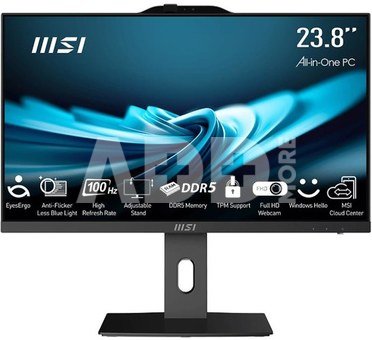
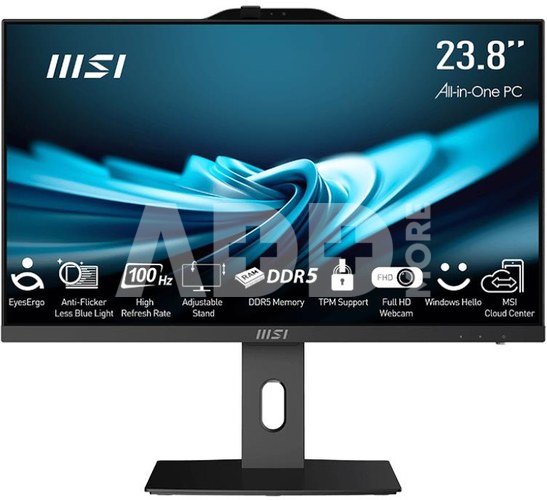
- 23.8-inch LED-backlit IPS liquid crystal panel (Full HD 1920x 1080 pixels)
- Intel Adler Lake series processors with DDR4 memory support
- MSI Anti-Flicker and Less Blue Light technologies protect the user's eyesight.
- Built-in webcam with Windows Hello support to help users increase their security and productivity
- 178-degree wide viewing angle
- Tobii Aware protects your privacy and security
- Wi-Fi 6 support
- Hardware TPM technology secures confidential data using encryption keys
- Immerse yourself in sound with DTS Audio Processing technology
- Silent PRO Cooling cooling system: Server-class cooling system ensures quiet and stable operation and longer life.
THE PRO SERIES AP242 COMPUTER WILL SIMPLIFY YOUR LIFE
All-in-One computers from the PRO AP242 series are equipped with eye-protecting panels and are characterized by high computing performance. The built-in FHD webcam will give you the best working experience. In addition, the 23.8-inch screen diagonal, two color versions and slim design make the PRO AP242 series computers match the style of any place, both at home and in the office.
Full HD webcam
Thanks to the MSI Full HD webcam, you can join a video conference or an online course and enjoy the opportunity to study or work remotely.
Windows Hello
The Windows Hello biometric authentication system is a faster and more secure way to make sure you're the one logging in to your computer.
A cover covering the webcam
You can cover your webcam at any time so that no one can see you and you can safely connect to the world.
Support for hardware TPM 2.0 technology
TPM 2.0 (Trusted Platform Module) technology is designed to provide users with hardware-based security features. Now, for advanced security, you can store your confidential data and passwords using encryption keys.
Improve your viewing experience. Experiences with the IPS panel
IPS panel with an extremely wide vertical and horizontal viewing angle of 178 degrees. Screen color and brightness are instantly optimized to enjoy every detail at its best and ensure consistent image quality from every angle.
Connect all your productive devices
Wi-Fi 6 puts more emphasis on transmission security and improves the signal, with the problem of interference, it can be connected to more devices at the same time, thus meeting the trend of increasingly higher data transmission bandwidth requirements with speeds up to 2.4 Gbps.
A design that allows for easy and effective assembly without the use of tools
Thanks to the specially designed design of the PRO AP242, which allows you to do without tools, the assembly and disassembly of the stand will no longer require looking for a screwdriver. The only thing you need are your hands.
Immerse yourself in sound
Immerse yourself in lossless music and the highest sound quality thanks to DTS Audio Processing technology. Explore and listen to natural-sounding sounds, music, movies and other sound effects, as they were intended by the creators.
We cool and quiet your world, even if you haven't noticed it
All-in-One computers from the PRO AP242 series are equipped with the Silent Pro cooling system. Part of this system is a server-class cooling module, which is responsible for dissipating heat from various components. In addition, the most important components are placed in the upper part of the computer case, so that warm air can easily escape. Moreover, the air flow has been distributed in such a way that the system temperature is always under control, thus ensuring coolness of all its elements, and at the same time achieving silent operation of the system.
Just enjoy quiet, stable and professional operation.






















Atsiliepimai
0 vidutinis įvertinimas (0 įvertinimų)