

+370 462 46444
I-V 10:00-19:00
VI 10:00-14:00

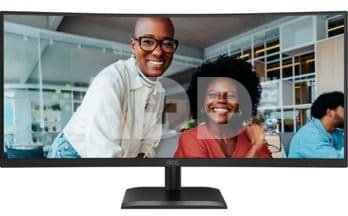
AOC CU34E4CV 34 Zoll QHD Monitor

AOC CU34E4CV 34 Zoll QHD Monitor
Kodas: 141387374VOK
Gamintojo kodas: CU34E4CV
Įsiminti
EU sandėlyje
Pristatymas 0-4 d.d.
Pasirinkite savybes
Spalva
349.00
Nuomoti(nuo €/diena)
Pratęsta garantija
Prekės draudimas

Nemokamai atsiimkite Kaune, parduotuvėje (Birželio 23-iosios g. 23g) Birželio 14 d.

Nemokamai atsiimkite Klaipėdoje, parduotuvėje (Taikos pr. 17) Birželio 14 d.

Pristatysime į namus per kurjerių tarnybą Birželio 16 d.

Turite klausimų? +370 462 46444 Siųskite užklausą

AprašymasAOC CU34E4CV 34 Zoll QHD Monitor aprašymas

The CU34E4CV features a 34-inch WQHD display with a 120 Hz refresh rate, HDR10, and hardware Anti-Blue Light, providing clear and comfortable viewing. Equipped with Smart KVM, a 90 W PD docking station, and a sleek, professional design, its perfect for boosting productivity and multitasking.

Wide QHD (WQHD) Resolution
With a resolution of 3440 x 1440, Wide Quad HD (WQHD) technology delivers excellent image quality and sharp visuals that reveal every detail. The 21:9 panoramic aspect ratio is ideal for watching widescreen movies or immersing yourself in the latest games, while also offering more workspace when its time to work. True 8-bit color ensures a wide color gamut for vivid, naturally looking images.

120 Hz Refresh Rate
Experience twice the frame rate of typical monitors and say goodbye to stuttering and motion blur. With a 120 Hz refresh rate, each frame is rendered sharply and smoothly, allowing precise aiming and full enjoyment of fast-paced racing and gaming action.

Height-Adjustable Stand
Raise or lower the screen to match the height and seating preferences of any user. The easily adjustable stand provides comfort for long hours of use.

Anti-Blue Light
AOC has developed an innovative solution to protect against the harmful effects of blue light emitted by computer screens. AOCs Anti-Blue Light technology reduces the intensity and strength of blue light while maintaining true colors and clarity.

USB-C Connectivity
Simplify connections with just one cable. The USB-C port supports DisplayPort Alternate Mode to transmit high-resolution video from a laptop to the monitor while simultaneously charging the laptop via USB power. Additionally, USB 3.1 enables lightning-fast data transfer, allowing even 4K video files to transfer in less than a minute.

90W Power Delivery
USB-C is a versatile technology that allows fast data transfer, video signal transmission, and device charging simultaneously. AOCs USB-C technology delivers up to 90 W, powering low- and high-power devices such as mice, keyboards, smartphones, and laptops.

KVM Switch
Share a single keyboard, mouse, and monitor between multiple computers with the built-in KVM switch.

Enjoy Gaming at Its Best with HDR10
HDR10 enhances image quality by synchronizing the GPU or console with the monitor, creating more realistic, immersive, and smooth gaming experiences. Youll feel like youre stepping into the game, frame by frame.

Garantinis laikotarpis 60 mėnesių

Svoris 14.2 kg

Pristatymo laikas 0-4 d.d.

Aptarkite su konsultantu Kaune

Neturime Kaunas Adresas: Birželio 23-iosios g. 23g Darbo laikas: I-V 09:00 - 18:00 VI-VII nedirba Telefonas: +370 674 59488
Kaunas

Aptarkite su konsultantu Klaipėdoje

Neturime Klaipėda Adresas: Taikos pr. 17 Darbo laikas: I-V 10:00 - 19:00 VI 10:00 - 14:00 VII nedirba Telefonas: +370 604 43972
Klaipėda
Specifikacija
Gamintojas(?) AOC
Garantinis laikotarpis 60 mėnesių
Svoris 14.2 kg
Pristatymo laikas 0-4 d.d.
Prekės kodai

141387374VOK CU34E4CV 4038986112864

Atsiliepimai

0 vidutinis įvertinimas (0 įvertinimų)

 0
 0
 0
 0
 0

Palikite atsiliepimą

Vertinti gali tik prisijungę vartotojai.

Palikti pirkėjų atsiliepimai (0)

Atsiliepimų kol kas nėra. Būk pirmas!

1. Į kokius veiksnius turėčiau atsižvelgti rinkdamasis monitorių žaidimams?

Renkantis žaidimų monitorių, svarbūs keli veiksniai. Ieškokite monitoriaus su dideliu atnaujinimo dažniu (pvz., 144 Hz ar didesniu), kad judesiai būtų sklandesni, mažu įvesties vėlavimu, kad tarp jūsų veiksmų ir atsako ekrane būtų minimali delsa, ir prisitaikančiomis sinchronizavimo technologijomis, pavyzdžiui, "G-Sync" arba "FreeSync". Apsvarstykite skydelio tipą; IPS skydeliai užtikrina geresnį spalvų tikslumą ir geresnius žiūrėjimo kampus, o TN skydeliai pasižymi greitesniu atsako laiku. Taip pat svarbi skiriamoji geba ir ekrano dydis, priklausomai nuo jūsų pageidavimų ir žaidimų įrangos galimybių.

2. Kaip skiriamoji geba veikia monitoriaus aiškumą ir kokia skiriamoji geba tinka mano poreikiams?

Skiriamoji geba yra esminis monitoriaus aiškumo aspektas, rodantis pikselių skaičių ekrane. Didesnės skiriamosios gebos, pavyzdžiui, 1440p (Quad HD) arba 4K, užtikrina ryškesnį vaizdą ir didesnę ekrano erdvę. Bendram naudojimui, įskaitant produktyvumo užduotis ir turinio vartojimą, dažnai pakanka 1080p (Full HD). Jei užsiimate grafiniu dizainu, vaizdo įrašų redagavimu ar žaidimais, didesnės raiškos ekranai gali pagerinti vaizdo patirtį. Tačiau, norint užtikrinti optimalų veikimą, būtina įsitikinti, kad jūsų vaizdo plokštė gali dirbti su pasirinkta skiriamąja geba.