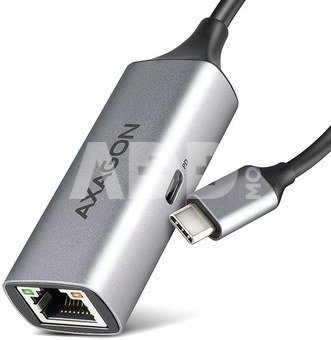
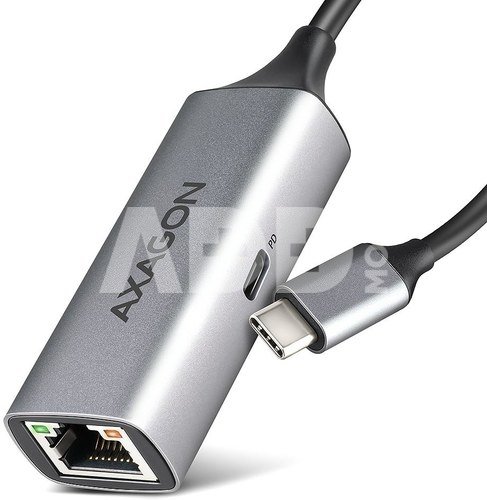
The external network card AXAGON ADE-TXPD with USB-C PD 100W connector easily converts the USB-C port to Gigabit Ethernet port. The adapter can add a missing RJ-45 network connector, add another network card, or replace the original non-functional network connection. A big advantage is the integrated Power Delivery connector, which allows you to connect a charger and thus provides the possibility of powering the laptop. Thanks to the 15 cm cable with USB-C connector, you can connect the Ethernet adapter to any computer, tablet or phone.
This USB network card is compatible with speeds of 10/100/1000 Mbit/s and expands your computer with a fast and stable network connection. In addition to gigabit throughput, the LAN adapter offers a wide range of functions, such as IPv4/IPv6 checksum to reduce CPU load by checksums, the crossover detection and auto-correction, TCP large send offload, support for various modes of the Wake-on-LAN feature, the work with VLAN and advanced Power Management features.
The PD USB-C input is designed for a suitable Power Delivery charger. Thanks to this, your mobile device is powered directly from the PD charger using Power Delivery 3.0 technology with a power of up to 100 W.
The metal adapter cover is made of aluminum and provides perfect mechanical protection and excellent heat dissipation. Due to its minimal dimensions and weight, it is an ideal accessory for laptops and other mobile devices.
The support for current versions of Windows, macOS, Linux or Chrome operating systems allows it to be used for any desktop, laptop or ultrabook equipped with a modern double-sided USB-C connector.
In Windows from version 8.1 and above, the adapter enables easy automatic installation without the need for an Internet connection. The Ethernet adapter can also be used by users of tablets or mobile phones running iPad OS, iOS or Android that support the possibility of wired Ethernet connection. In addition, thanks to the chip used, the adapter is also supported by the operating system of Nintendo Switch game consoles.
Input (laptop connection):
USB 5Gbps (USB 3.2 Gen 1 / USB 3.0), USB-C female connector.
Compatible with USB 3.2 Gen 2, USB4 and Thunderbolt 3/4.
Input (power supply):
USB Power Delivery 3.0 - 100W port (only for charging), USB-C female connector.
Powering a mobile device from a PD charger via a USB-C network card.
PD power must be supported by both the mobile device and the charger.
Output:
Gigabit Ethernet interface with RJ-45 connector for UTP or STP cable connection.
Supported transmission rates for the Ethernet interface 10/100/1000 Mb/s.
Supported IEEE 802.3 10Base-T, IEEE 802.3u 100Base-TX, IEEE 802.3ab 1000Base-T specifications.
10/100/1000 Mb/s auto-detection.
Supports IPv4 / IPv6 packet Checksum Offload Engine (COE) to reduce processor load, including IPv4 IP/TCP/UDP/ICMP/ IGMP & IPv6 TCP/UDP/ICMPv6 checksum control and generation.
Supports TCP Large Send Offload V1 and V2.
Supports IEEE 802.1P Layer 2 priority encoding & decoding.
Supports IEEE 802.1Q VLAN tagging.
Supports IEEE 802.3az EEE (Energy Efficient Ethernet) - reduce power consumption at rest.
Supports Jumbo frame.
Supports Auto MDI/MDIX - crossover detection and auto-correction, eliminates the need for crossover cables.
Other features:
Full Plug and Play and Hot Plug support.
Supports CDC-ECM for automatic installation of drivers across different OSs.
CDC-NCM support - for native support without driver installation in iOS/iPadOS/macOS/Linux.
USB bus power - no additional power supply is required.
Two LEDs to indicate network activity and the adapter's connection to the network.
Dimensions 76 x 24 x 16 mm.
Weight 28 g (incl. cable).
USB cable length 15 cm.
ASIX AX88179A chipset is used.
Wake-on-LAN feature support in different modes:
Supports sleep mode and remote Wake Up via Magic Packet, Microsoft Wakeup Frame and Link Change Wake-up.
Supports Bonjour wake-on-demand.
Supports Wakeup Packet Indication.
Supports Microsoft Modern Standby.
Advanced Power Management features:
The adapter supports advanced power management to reduce losses during standby or light traffic on the network. It further supports advanced power saving when the Ethernet cable has been disconnected.
Supports Power Management offload (ARP & NS).
Supports ECMA-393 proxZzzy standard for sleeping hosts to manage the network connection of sleeping guests using proxy servers.
Supported operating systems:
Windows, macOS, iPadOS, iOS, Linux, Chrome OS, Nintendo Switch system software and Android (WARNING - check with the Android device manufacturer if the Ethernet connection is supported).
Package contains:
USB - Gigabit Ethernet adapter with fixed 15 cm long USB-C cable,
multilingual manual CZ / DE / DK / ENG / ESP / FIN / FR / GR / HR / HU / IT / NL / PL / PT / RO / SK / SWE / TR / UA / BG / CN / ARA,
packed in a cardboard box with a hanging hole.

















Atsiliepimai
0 vidutinis įvertinimas (0 įvertinimų)