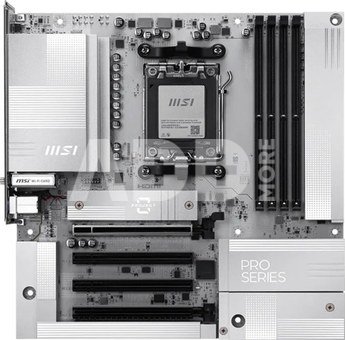
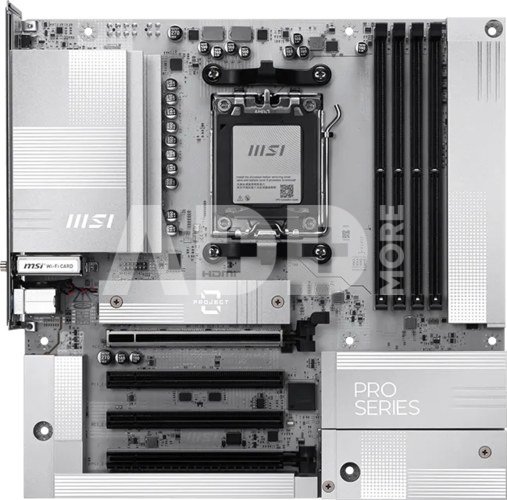
MSI PRO B850M-A WIFI PZ | Processor family AMD | Processor socket AM5 | DDR5 | Supported hard disk drive interfaces SATA, M.2 | Number of SATA connectors 4
Kodas: 69981RME
Gamintojo kodas: PRO B850M-A WIFI PZ
Įsiminti
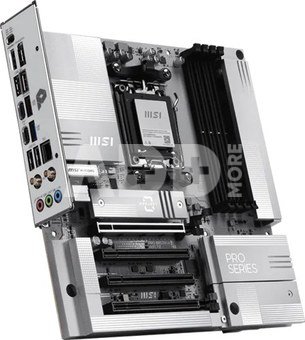
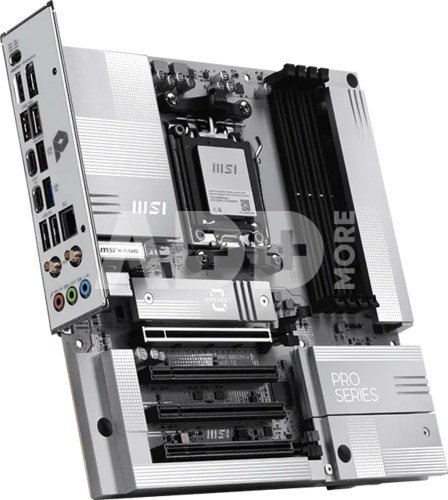
PRO B850M-A WIFI PZ offers a sleek design with a harmonious silver-white color scheme that perfectly matches white PC builds. Its innovative back-connect design reduces the complexity of cable management, resulting in an aesthetically pleasing appearance for the system. It is engineered with many exclusive features of MSI, Wi-Fi 7 with EZ Antenna, 5G LAN, PCIe 5.0 M.2, and Supplemental PCIe Power, ready for the AMD Ryzen™ 9000 series processors.
The PRO Series is tailored to professionals from all walks of life. The lineup features impressive performance and high quality, while aiming to provide users incredible experience. Users who care about productivity and efficiency can definitely count on the MSI PRO Series to assist you with multitasking and increasing efficiency.
MSI motherboards are designed with advanced hardware and technology, well-supporting the demanding computing usage of gaming and AI. Moreover, we also introduce AI to MSI Center and BIOS, making everything more effortless than before.
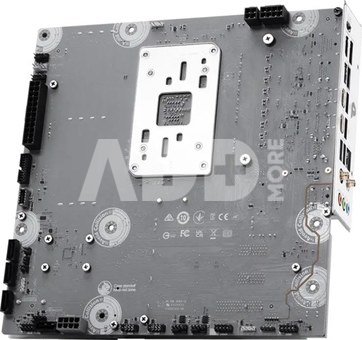
Back-Connect Design
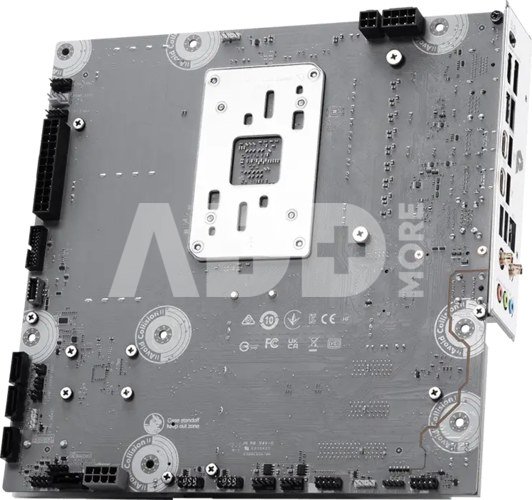
The PRO B850M-A WIFI PZ features a back-connect design, which relocates the motherboard power, CPU power, fan pins, SATA, and other interfaces to the back of the motherboard. This allows for simpler cable management, while also providing a cleaner and more aesthetically pleasing appearance for the system.
One Finger for EZ GPU Installation
The new EZ PCIe Clip II, located on the first slot, features the rebounding force mechanism that allows for easy removal of the graphics card by pressing the tail-like lock with one finger. Due to this exquisite design, users can uninstall the graphics cards effortlessly, even in the cramped case spaces.
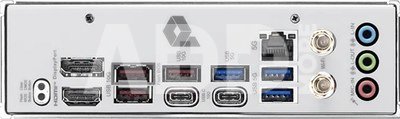
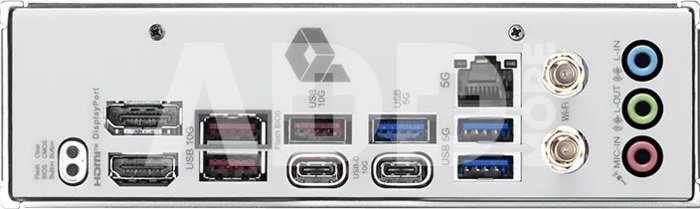
The Pre-Installed I/O Shield offers a streamlined and hassle-free installation experience by eliminating the need to manually fit the I/O shield during motherboard setup. With its built-in design, it ensures proper alignment and a secure fit, providing both protection and convenience while enhancing the overall durability of your build.
MSI EZ Antenna makes the process effortless by simply attaching fasteners to the motherboard without rotation.
Onboard LEDs will indicate the source of the problem so you know exactly where to look to get up and running again.
This LED lights up when it detects faulty memory in slots, eliminating guesswork from troubleshooting.
DIRECT 8+2+1 POWER DESIGN
Unleash and sustain the maximum performance with a VRM design built with a total of 8+2+1 digital power phases. With 8+4-pin power connectors, PRO B850M-A WIFI PZ is ready for the challenge of heavy-loading tasks.
OPTIMIZED PCB SOLUTION
The PCB design has been optimized for higher bandwidth and faster transfer speeds, which is also beneficial for reliable circuit transmission.
DDR5 MEMORY SUPPORT WITH HIGH PERFORMANCE
A huge step of DDR performance enhancement with the latest DDR5 memory. Combines with dedicated SMT welding process and MSI Memory Boost technology, PRO B850M-A WIFI PZ is ready to deliver the world class memory performance.
Transient Voltage Suppressors (TVS)
Transient Voltage Suppressors (TVS) are safety devices used to protect against excessive voltage. All motherboard models of MSI are equipped with TVS. When the voltage abnormally rises, the TVS switches from a high-resistance state to a low-resistance state, diverting the excessive voltage to ground. This helps prevent circuit damage caused by high voltage.
DIY 2.0 – INTEGRATING WITH THE SYSTEM ENVIRONMENT
Connect and synchronize with MSI coolers and cases with strategically positioned pin-header locations including a dedicated pump-fan header.
Cooling Wizard serves as a comprehensive solution for managing fan settings across all MSI products. It ensures superior cooling performance and noise reduction for your gaming PC, offering compatibility with PWM/DC fans and pumps, customizable options, and intuitive temperature monitoring for optimal operation with one click.
HIGH-BANDWIDTH AND LOW-LATENCY NETWORK
MSI's premium network solution provides incredible data transfer speed for demanding users.
THE NEXT GEN WI-FI SOLUTION – WI-FI 7
Wi-Fi 7 is the latest wireless solution that takes a huge leap forward with multiple improvements to meet the traffic demand brought and the growing number of wireless devices.
AI LAN Manager
MSI AI LAN Manager automatically classifies and prioritizes the latency-sensitive applications for online games, giving you the best online gaming experience with low latency.
FAST AND FUTURE-READY STORAGE
MSI PRO series motherboards support all the latest storage standards, which allows users to connect any ultra-fast storage device. Start games faster, load levels faster and have a real advantage over your enemies.
LIGHTNING GEN 5 PCI-E WITH STEEL ARMOR
SMT PCIE 5.0 SLOT
The advanced SMT(Surface Mount Technology) PCIE slot diminish interference and electrical noise, fully support the PCI-E 5.0 signal.
REINFORCED,
HEAVY SOLDERED CONNECTIONS
MSI PCI Express Steel Armor slots are secured to the motherboard with extra solder points and support the weight of heavy graphics cards. When every advantage in games counts, Steel Armor shields the point of contact from electromagnetic interference.
Pristatymo laikas
0-4 d.d.
Aptarkite su konsultantu Kaune
Neturime
Kaunas Adresas: Birželio 23-iosios g. 23g Darbo laikas: I-V 09:00 - 18:00 VI-VII nedirba Telefonas: +370 674 59488
Aptarkite su konsultantu Klaipėdoje
Neturime
Klaipėda Adresas: Taikos pr. 17 Darbo laikas: I-V 10:00 - 19:00 VI 10:00 - 14:00 VII nedirba Telefonas: +370 604 43972
1. Kaip pasirinkti tinkamą klaviatūrą ir pelę savo kompiuteriui?
Norint pasirinkti tinkamą klaviatūrą ir pelę savo kompiuteriui svarbu atsižvelgti į asmeninius poreikius ir naudojimo būdą. Klaviatūros pasirinkimas priklauso nuo jūsų darbo pobūdžio, ergonominių poreikių ir asmeninio komforto. Jei daug laiko praleidžiate rašydami, svarbu rinktis klaviatūrą su maloniu klavišų paspaudimu ir ergonomišku dizainu, kuris sumažina rankų ir pečių įtempimą. Specializuotos klaviatūros, kuriose yra papildomų funkcijų, pavyzdžiui, programuojamų klavišų arba spalvotų šviesų, gali pagerinti naudotojo patirtį. Pelės pasirinkimas gali priklausyti nuo jūsų darbo pobūdžio – grafikos dizaineriams arba žaidimų entuziastams gali reikėti aukštos raiškos ir didelio jautrumo pelės. Ergonominės pelės su daugiau nei vienu mygtuku gali palengvinti darbą su įvairiomis programomis. Be to, svarbu atkreipti dėmesį į sąveiką su jūsų kompiuterio tipu (ar tai belaidė, ar laidinė klaviatūra ir pelė) bei patogią ergonomiją. Prieš perkant, būtina išbandyti klaviatūrą ir pelę, kad įsitikintumėte, jog jos atitinka jūsų poreikius ir yra patogios naudoti.
2. Kokios yra geriausios aušinimo sistemos kompiuteriui?
Geriausią aušinimo sistemą galima pasirinkti atsižvelgiant į kompiuterio naudojimo scenarijų. Vandens aušinimas dažnai būna efektyvus, ypač esant dideliam apkrovimui, o oro aušinimas yra paprastesnis ir pigesnis variantas. Keletas populiarių aušinimo būdų apima: 1) Oro aušinimas (Air Cooling): Paprasta ir ekonominė alternatyva, naudojanti didelius ventiliatorius, šilumos vamzdžius ir radiatorius. Šis būdas tinka vidutinio ir žemo lygio naudotojams. 2) Vandens aušinimas (Liquid Cooling): Ši sistema naudoja specialų šilumos siurblių ir vamzdžių rinkinį, leidžiantį aušinti komponentus vandeniu. Tai dažnai naudojama su pažangesniais procesoriais ir vaizdo plokštėmis, tačiau reikalauja tikslaus diegimo. 3) Phase Change Cooling: Labai efektyvi sistema, kuri naudoja šaltus dujų ciklus, kad transformuotų dujas į skysčius ir atvirkščiai. Tai brangesnė alternatyva, bet suteikia itin efektyvų aušinimą. 4) Termoelektrinė (Peltier) sistema: Šio tipo sistema naudoja Peltier elementus, kurie gali perkelti šilumą iš vienos pusės į kitą, priklausomai nuo elektros srovės krypties. Ši sistema gali būti derinama su kitomis aušinimo metodikomis. Geriausią pasirinkimą lemia naudojimo atvejis, biudžetas ir pageidaujamas efektyvumas. Priklausomai nuo to, ar norite paprasto, bet patikimo oro aušinimo, ar pažangesnės technologijos su vandeniu, turite rinktis tai, kas geriausiai atitinka jūsų poreikius.
















Atsiliepimai
0 vidutinis įvertinimas (0 įvertinimų)