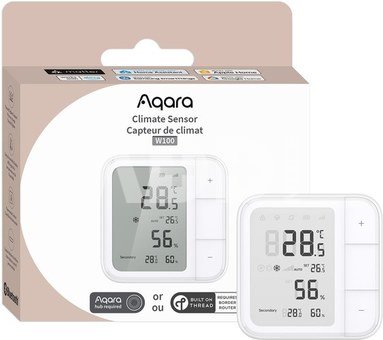
Aqara Climate Sensor W100
-19%
|
Kodas: 10091NRD
Gamintojo kodas: TH-S04D
Įsiminti
Smarten up your comfort with style and precision
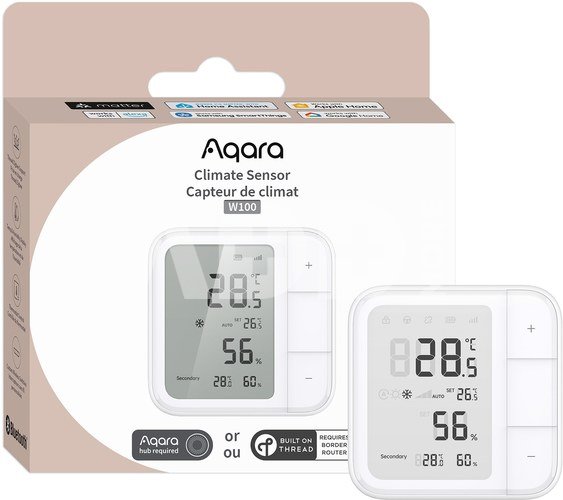
A high-precision sensor with a 3.4-inch LCD screen monitors temperature and humidity in real time. Supporting Zigbee and Thread, it integrates with third-party ecosystems or connects via an Aqara hub for extended features like remote HVAC control. With 3 customisable buttons for up to 9 actions, it enhances comfort, energy efficiency, and smart home automation.
Dual-Protocol with Matter Compatibility
Supports both Matter over Thread① and Zigbee②. The Matter compatibility ensures integrating seamlessly with third-party ecosystems such as Apple Home, Amazon Alexa, Google Home, etc. creating a more comprehensive and unified experience that is future-proof and highly adaptable. While Zigbee with an Aqara hub helps users experience exclusive Aqara Home features. You can switch③between desired protocols based on preference.
3 Smart Button Customisation
Equipped with 3 customisable buttons, supporting single, double and long press operations, enabling up to 9 automations or scene configurations④. Whether you want to turn on/off your device through wireless control, or switching to comfort mode with one button, the flexibility allows you to easily create an ideal living environment, adjust home comfort in real time.
Precision Sensor with LCD Display
This device features a high-precision temperature (±0.2℃) and humidity (±2%RH) sensor, along with a 3.4-inch LCD screen for real-time environmental data. It not only enhances home comfort but also ensures optimal conditions for storage, greenhouses and a healthy environment for sensitive groups.
External Sensor Integration
In Zigbee mode, the device can connect to an Aqara temperature and humidity sensor⑤ to display additional data in the secondary screen area⑥, allowing users to monitor conditions in different locations simultaneously. If no external sensor is connected, the secondary screen area defaults to local temperature and humidity information, helping users easily understand their environment and maintain a comfortable living space.
HVAC Remote Control Integration
The sensor can be paired with an Aqara thermostat⑦ via an Aqara hub OR a third-party IR air conditioner via Aqara Hub M3 to enable wireless remote control of the HVAC system. This allows you to adjust the temperature, humidity, mode, and other settings directly from the device, automatically adjusting the environmental comfort and improving energy efficiency without actually visiting the HVAC unit.
Long Battery Life with Configurable Performance
Powered by 2 CR2450 batteries, the device delivers an impressive battery life of up to 2.4 years on Zigbee mode and 2.3 years on Thread mode⑧ with regular use. You have the flexibility to adjust the sensor’s sampling and reporting frequency⑨ to further balance performance with power consumption. This adaptability ensures reliable, long-term functionality with minimal maintenance, providing a seamless and hassle-free smart home experience.
① To use the device with a particular Matter ecosystem, a Matter Controller of this ecosystem and a Thread Border Router are required.
② Aqara Zigbee hub required
③ To switch protocols, you need to factory reset the device.
④ Previously set wireless switch configurations will be disabled when the device is connected with an Aqara thermostat.
⑤ Linking with an Aqara’s temperature and humidity sensor is only available through the Aqara Home app on Zigbee mode.
⑥ Secondary area display is only available when the device is connected to an Aqara hub in Zigbee mode.
⑦ At present, the device can only be connected to the Aqara Radiator Thermostat E1, through Aqara Home app settings on Zigbee mode. Future updates will enable compatibility with additional Aqara thermostat devices as they are released. Connect to Radiator Thermostat group function will realize after launch through OTA.
⑧ The battery life data is based on tests conducted by the Aqara Laboratory under default device settings. Actual battery life may vary depending on factors such as communication protocol, wireless button usage frequency, and sensor sampling/reporting intervals.
⑨ Only available through Aqara Home app settings on Zigbee mode.
Pristatymo laikas
10-19 d.d.
Aptarkite su konsultantu Kaune
Neturime
Kaunas Adresas: Birželio 23-iosios g. 23g Darbo laikas: I-V 09:00 - 18:00 VI-VII nedirba Telefonas: +370 674 59488
Aptarkite su konsultantu Klaipėdoje
Neturime
Klaipėda Adresas: Taikos pr. 17 Darbo laikas: I-V 10:00 - 19:00 VI 10:00 - 14:00 VII nedirba Telefonas: +370 604 43972
1. Kaip pasirinkti tinkamą klaviatūrą ir pelę savo kompiuteriui?
Norint pasirinkti tinkamą klaviatūrą ir pelę savo kompiuteriui svarbu atsižvelgti į asmeninius poreikius ir naudojimo būdą. Klaviatūros pasirinkimas priklauso nuo jūsų darbo pobūdžio, ergonominių poreikių ir asmeninio komforto. Jei daug laiko praleidžiate rašydami, svarbu rinktis klaviatūrą su maloniu klavišų paspaudimu ir ergonomišku dizainu, kuris sumažina rankų ir pečių įtempimą. Specializuotos klaviatūros, kuriose yra papildomų funkcijų, pavyzdžiui, programuojamų klavišų arba spalvotų šviesų, gali pagerinti naudotojo patirtį. Pelės pasirinkimas gali priklausyti nuo jūsų darbo pobūdžio – grafikos dizaineriams arba žaidimų entuziastams gali reikėti aukštos raiškos ir didelio jautrumo pelės. Ergonominės pelės su daugiau nei vienu mygtuku gali palengvinti darbą su įvairiomis programomis. Be to, svarbu atkreipti dėmesį į sąveiką su jūsų kompiuterio tipu (ar tai belaidė, ar laidinė klaviatūra ir pelė) bei patogią ergonomiją. Prieš perkant, būtina išbandyti klaviatūrą ir pelę, kad įsitikintumėte, jog jos atitinka jūsų poreikius ir yra patogios naudoti.
2. Kokios yra geriausios aušinimo sistemos kompiuteriui?
Geriausią aušinimo sistemą galima pasirinkti atsižvelgiant į kompiuterio naudojimo scenarijų. Vandens aušinimas dažnai būna efektyvus, ypač esant dideliam apkrovimui, o oro aušinimas yra paprastesnis ir pigesnis variantas. Keletas populiarių aušinimo būdų apima: 1) Oro aušinimas (Air Cooling): Paprasta ir ekonominė alternatyva, naudojanti didelius ventiliatorius, šilumos vamzdžius ir radiatorius. Šis būdas tinka vidutinio ir žemo lygio naudotojams. 2) Vandens aušinimas (Liquid Cooling): Ši sistema naudoja specialų šilumos siurblių ir vamzdžių rinkinį, leidžiantį aušinti komponentus vandeniu. Tai dažnai naudojama su pažangesniais procesoriais ir vaizdo plokštėmis, tačiau reikalauja tikslaus diegimo. 3) Phase Change Cooling: Labai efektyvi sistema, kuri naudoja šaltus dujų ciklus, kad transformuotų dujas į skysčius ir atvirkščiai. Tai brangesnė alternatyva, bet suteikia itin efektyvų aušinimą. 4) Termoelektrinė (Peltier) sistema: Šio tipo sistema naudoja Peltier elementus, kurie gali perkelti šilumą iš vienos pusės į kitą, priklausomai nuo elektros srovės krypties. Ši sistema gali būti derinama su kitomis aušinimo metodikomis. Geriausią pasirinkimą lemia naudojimo atvejis, biudžetas ir pageidaujamas efektyvumas. Priklausomai nuo to, ar norite paprasto, bet patikimo oro aušinimo, ar pažangesnės technologijos su vandeniu, turite rinktis tai, kas geriausiai atitinka jūsų poreikius.
















Atsiliepimai
0 vidutinis įvertinimas (0 įvertinimų)