




+370 462 46444
I-V 10:00-19:00
VI 10:00-14:00

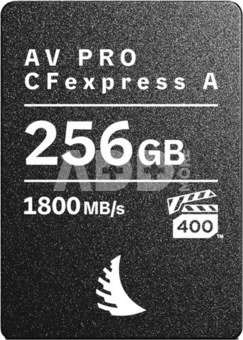
Angelbird memory card CFexpress 4.0 Type A 256GB AV PRO

Angelbird memory card CFexpress 4.0 Type A 256GB AV PRO
Kodas: 09419NRD
Gamintojo kodas: AVP256CFXAMK2
Įsiminti
EU sandėlyje
Pristatymas 5-10 d.d.
Pasirinkite savybes
Spalva
329.00
Nuomoti(nuo €/diena)
Pratęsta garantija
Prekės draudimas

Nemokamai atsiimkite Kaune, parduotuvėje (Birželio 23-iosios g. 23g) Birželio 21 d.

Nemokamai atsiimkite Klaipėdoje, parduotuvėje (Taikos pr. 17) Birželio 21 d.

Pristatysime į namus per kurjerių tarnybą Birželio 23 d.

Turite klausimų? +370 462 46444 Siųskite užklausą

AprašymasAngelbird memory card CFexpress 4.0 Type A 256GB AV PRO aprašymas

  • CFexpress™ 4.0 Type A
  • Max read speed: 1800 MB/s
  • Max write speed: 1650 MB/s
  • Sustained read speed: 1700 MB/s
  • Sustained write speed: 800 MB/s

The AV PRO CFexpress A is the ultimate card for professionals, offering double the speed of our SE model and up to 1TB of capacity. This future-proof card provides fast file offloading, perfect for Sony users capturing high-data-rate video, stills, and 8K RAW bursts.

Tip: this card is supported by Sony's CFexpress Type A cameras and is backward compatible with CFexpress 2.0 devices. It supports all features across Sony's CFexpress Type A cameras, including models like the Sony α1, Sony α1 II, Sony α7 IV, Sony α7S III, Sony α7R V, Sony FX3, Sony FX30, and Sony FX6.

Capture high-res data without any lagging
Experience consistent write speed of 800 MB/s throughout the recording (not just at the beginning). Sustained write speed you can rely on.

Built to last
This durable card is extreme temperature, moisture, dust, shock, x-ray, and magnet-proof. Tough enough to handle whatever your production game throws at it.

Less strain on your camera battery
This card operates with as minimal power draw as possible. Engineered to keep your camera battery alive as long as possible.

Enjoy smooth, drop-free results
Our Stable Stream™ technology ensures uninterrupted read and write performance across the entire capacity. Never worry about a frame drop.

Safe shutdown to protect your work
When your camera’s battery is low or loses power, the Host Power Loss Protection saves buffer files & safely shuts down the card to avoid any losses.

Lower the risk of your gear overheating
Angelbird’s Advanced Thermal Management feature protects card from overheating by going into a low power safe mode when it’s not in use.

3-year limited warranty
Activate your product benefits within 30 days of purchase and receive 3-year limited warranty including individualized customer service, technical support and free data recovery service on hard- and software level provided by the Angelbird tech team in Austria.

Pristatymo laikas 5-10 d.d.

Aptarkite su konsultantu Kaune

Neturime Kaunas Adresas: Birželio 23-iosios g. 23g Darbo laikas: I-V 09:00 - 18:00 VI-VII nedirba Telefonas: +370 674 59488
Kaunas

Aptarkite su konsultantu Klaipėdoje

Neturime Klaipėda Adresas: Taikos pr. 17 Darbo laikas: I-V 10:00 - 19:00 VI 10:00 - 14:00 VII nedirba Telefonas: +370 604 43972
Klaipėda
Specifikacija
Gamintojas(?) Angelbird
Pristatymo laikas 5-10 d.d.
Prekės kodai

09419NRD AVP256CFXAMK2 9120056587155

Atsiliepimai

0 vidutinis įvertinimas (0 įvertinimų)

 0
 0
 0
 0
 0

Palikite atsiliepimą

Vertinti gali tik prisijungę vartotojai.

Palikti pirkėjų atsiliepimai (0)

Atsiliepimų kol kas nėra. Būk pirmas!

1. Koks yra pagrindinis skirtumas tarp USB flash drive ir išorinio kietojo disko (HDD)?

Pagrindinis skirtumas tarp USB flash drive (USB atmintinės) ir išorinio kietojo disko (HDD) yra jų saugojamo duomenų tipas ir talpa. USB flash drive yra mažo dydžio, turi mažesnę talpą ir dažniausiai naudojamas laikinam duomenų pernešimui. Kita vertus, išorinis HDD yra didesnis, gali turėti didesnę talpą ir dažniau naudojamas kaip ilgalaikė atminties saugykla su didesniu saugojimo potencialu. Flash drive yra patogus nešiojamas įrankis, o išorinis HDD daugiau tinkamas didelio dydžio failų, programų ar atsarginių kopijų saugojimui.

2. Kaip saugoti skaitmenines laikmenas, kad išvengtumėte duomenų praradimo?

Norint išvengti duomenų praradimo skaitmeninėse laikmenose, svarbu reguliariai daryti atsargines kopijas. Saugokite svarbius duomenis ne tik vienoje, bet ir keliuose saugos vietose, įskaitant debesų saugyklas. Vengkite staigių įrenginių išjungimų, nes tai gali sukelti duomenų sugadinimus. Naudojant USB flash drive ar išorinį kietąjį diską, atjunkite įrenginį saugiai, laikydamiesi operacinės sistemos nurodymų. Nustatykite slaptažodį ar šifravimą, kad apsaugotumėte asmeninius duomenis. Periodiškai tikrinkite ir atnaujinkite antivirusinę programą, kad išvengtumėte kenkėjiškos programinės įrangos. Šie veiksmai padės užtikrinti skaitmeninių laikmenų patikimą duomenų saugojimą.










