



+370 462 46444
I-V 10:00-19:00
VI 10:00-14:00

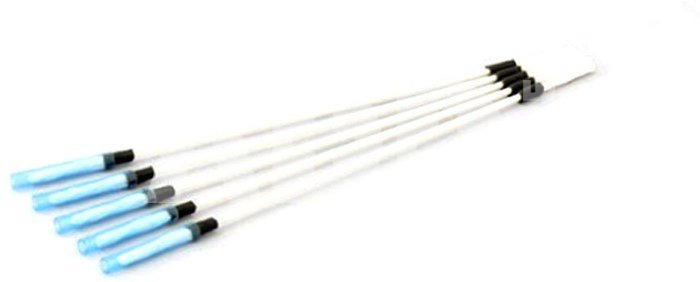
Canare CLETOP 2.5/2.0 Cleaning Stick (1pc)

Canare CLETOP 2.5/2.0 Cleaning Stick (1pc)
Code: 08223AVX
Manufacturer code: -
Add to wishlist
EU warehouse
Delivery 11-14 w.d.
Choose properties
Color
4.20
Extended warranty
Product insurance

Pick up for free in the store in Kaunas (Birželios 23-iosios str. 23g) Liepos 03 d.

Pick up for free in Klaipėda, in the store (Taikos pr. 17) Liepos 03 d.

We will deliver to your home via courier service Liepos 05 d.

Turite klausimų? +370 462 46444 Send request

DescriptionCanare CLETOP 2.5/2.0 Cleaning Stick (1pc) description

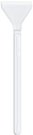
Canare CLETOP 2.5/2.0 Cleaning Stick (1pc) for maintaining Hybrid Fiber Optic connectors. 

  • Compact and disposable
  • Allows cleaning both the tips and sides of ferrules
  • Manufactured by NTT -AT

Maintaining Hybrid Fiber-Optic Camera Connectors
The connector sections to be cleaned are the key parts, including the tips and sides of ferrules, the interior walls of alignment sleeves and the interior and exterior of connector shells. Note that scratches and particles of foreign matter on the tip of the ferrule can have a disabling effect on fiber-optic transmission. The following procedures should be used when cleaning hybrid fiber-optic camera connectors.

•For Plugs, the interior surfaces of alignment sleeves and the tips of ferrules are to be cleaned with the non - alcohol treated cleaning stick using a gentle stroking action.
Canare FCFA and FCFRA enhance easy cleaning procedure for its innovative alignment sleeve and insulator detachable design.
US Patent : No.7241055B2, JP Patent : No.4340186

• For Jacks, it is important to clean both the tips and sides of the completely protruding ferrules with the cleaning stick.
• Both the male and female connector shells tend to attract dust and metal particles, so it is important to clean both the insides and outsides using cotton gauze or similar material.

Delivery time 11-14 w.d.

Discuss with a consultant in Kaunas

We don't have Klaipėda Address: Birželio 23-iosios g. 23g Working hours: I-V 09:00 - 18:00 VI-VII not working Phone: +370 674 59488
Kaunas

Discuss with a consultant in Klaipėda

We don't have Klaipėda Address: Taikos pr. 17 Working hours: I-V 10:00 - 19:00 VI 10:00 - 14:00 VII not working Phone: +370 604 43972
Klaipėda
Specification
Producer(?) Canare
Delivery time 11-14 w.d.
Product codes

08223AVX CLETOP2.5/2.0

Reviews

0 average rating (0 votes)

 0
 0
 0
 0
 0

Leave a comment

Only registered users can rate.

Customer reviews (0)

There are no reviews. Be first!

1. What basic tools are required for camera cleaning and why is it important?

The main tools for cleaning a camera include special cleaning devices and brushes, microfiber cloths, air blowers, and cleaning fluids. This is important because regular cleaning of the camera helps maintain high photo quality and prevents technical malfunctions. Dust, dirt, or stains on the lens or sensor can negatively affect image quality, causing blurriness. Additionally, over time, dirt, sweat, or grease can accumulate on the lens and other surfaces, interfering with the proper functioning of the camera. Using the right cleaning tools allows for safe dirt removal without risking damage to the lens or sensor. Periodic camera cleaning improves the equipment's longevity and ensures each shot is of high quality. Cleaning is especially important in environments with a lot of dust or when the camera is used outdoors, where it may be affected by weather conditions.

2. How to safely clean a camera lens and why should it be done carefully?

Cleaning the lens is essential, but it should be done carefully to avoid damaging the optical system. When cleaning the lens, use a gentle material, such as a microfiber cloth. Before cleaning, remove dust and small particles with a brush or air to prevent damaging the lens surface. Cleaning fluids should be specifically designed for lenses. Do not use alcohol or household cleaners on the lens, as they can damage the special coating or the lens surface. Special cleaning fluid can be applied directly to the lens or using a dedicated applicator. When cleaning, move in circular motions from the center to the edges, avoiding spiral movements that could cause damage. It is important to avoid pressure and excessive force, as this can damage the lens mechanisms. Cleaning is best done regularly to remove dust and particles in time, maintaining good image quality and extending the lifespan of the lens.