






+370 462 46444
I-V 10:00-19:00
VI 10:00-14:00

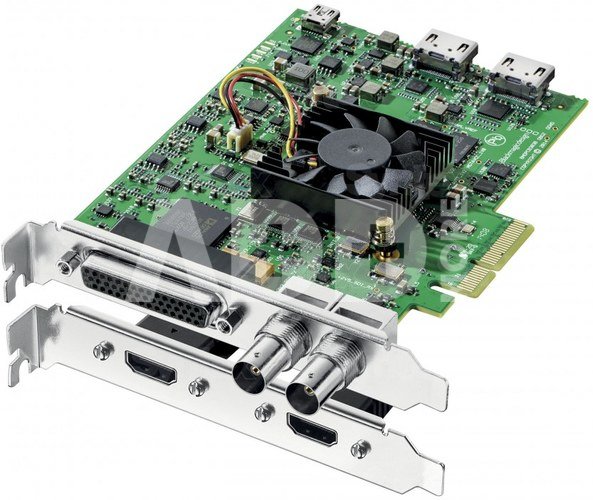
DeckLink Studio 4K

DeckLink Studio 4K
Kodas: 00525AVX
Gamintojo kodas: -
Įsiminti
EU sandėlyje
Pristatymas 11-14 d.d.
Pasirinkite savybes
Spalva
639.00
Nuomoti(nuo €/diena)
Pratęsta garantija
Prekės draudimas

Nemokamai atsiimkite Kaune, parduotuvėje (Birželio 23-iosios g. 23g) Birželio 27 d.

Nemokamai atsiimkite Klaipėdoje, parduotuvėje (Taikos pr. 17) Birželio 27 d.

Pristatysime į namus per kurjerių tarnybą Birželio 29 d.

Turite klausimų? +370 462 46444 Siųskite užklausą

AprašymasDeckLink Studio 4K aprašymas

New DeckLink SDI 4K and the DeckLink Studio 4K models now include all the features of the previous models, but with faster 4 lane PCIe connections and 6G-SDI and HDMI 4K connections to allow SD, HD and Ultra HD capture and playback. These new cards also support capture and playback at the same time when used with software that supports this feature such as DaVinci Resolve. The new models replace the older DeckLink SDI and DeckLink Studio models, however are lower cost.

Blackmagic Design DeckLink SDI 4K

The new DeckLink 4K cards break new ground in offering Ultra HD, 6G-SDI and HDMI 4K connections at very affordable price points. DaVinci Resolve 11 customers will benefit from the capture and playback support as this lets them capture direct from cameras on set, grade the live video with multiple nodes of correction and then to output to an on set monitor all live. This makes lighting a film set easy and allows DOP’s, directors and colorists to work together to optimize the film’s look on set. Other features included in these new models that benefit DaVinci Resolve customers include new frame buffer formats supporting R10K RGB, higher frame rates and much more.

DeckLink Studio 4K
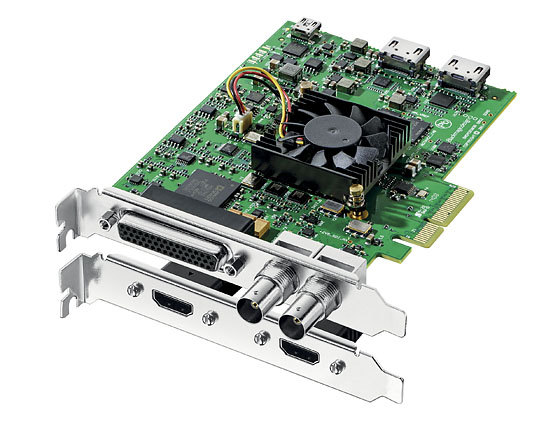
The larger DeckLink Studio 4K model is the perfect capture card for when you’re in a complex environment where you need to capture and playback with a mix of SDI, HDMI and analog devices. This can be common in post production facilities where customers never know what kind of format a client might need to use on a session. This model includes 6G-SDI, HDMI 4K and analog component, s-video and composite inputs and outputs all on separate connections, so multiple external devices can be connected all at once. This model also includes 2 channel AES/EBU and 4 channels of balanced professional analog audio inputs and outputs all on separate audio connections.

The DeckLink Studio 4K card includes all connections, apart from the SDI and HDMI connections via a 4 pin break out cable. An optional longer 2 meter break out cable can be purchased. DeckLink SDI 4K and DeckLink Studio 4K are the perfect solutions that can be installed inside high performance workstations for broadcast design, editing, paint, color correction, visual effects and more.
Blackmagic Design DeckLink Studio 4K
New SDK
OEM developers will also like the multiple new features in these models as they greatly benefit customized system development. These new features include full frame genlock timing, closed caption in all bit rates, automatic input detection support, better CRC input checking, extremely low latency and Direct GPU support, plus the ability to write pixels directly into the cards frame buffers and the ability to write their own custom drivers.

Blackmagic Design DeckLink Studio 4K

DeckLink Studio 4K Key Features
- 6G-SDI in and out, supports SD, HD up to 1080p60, 2K and Ultra HD capture and playback.
- HDMI 4K in and out, supports SD and HD formats up to 1080p60.
- Component analog in and out, supports SD and HD formats up to 1080p60, s-video and composite.
- 4 channels of balanced analog audio in and out on jack connectors.
- 2 channel AES/EBU balanced audio in and out on jack connectors.
vGenlock/tri-sync input.
- Sony™ compatible RS-422 deck control.
- Supports uncompressed 8, 10 and 12 bit and compressed video capture and playback.
- Plugs into older model MacPro, Windows and Linux computers.
- Supports DaVinci Resolve, Final Cut Pro™, Adobe Premiere Pro™, Photoshop™, After Effects™ and more.
- Includes free developer SDK for Windows, Mac and Linux.
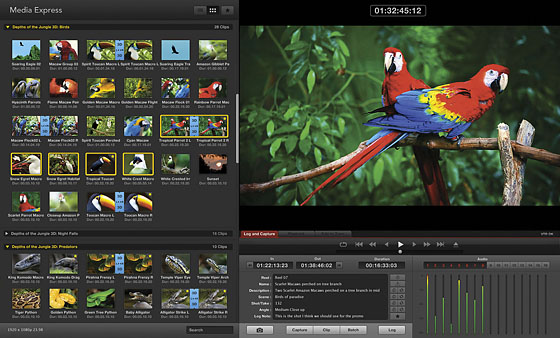
- Includes free Media Express capture and playback software for Windows, Mac and Linux.

Pristatymo laikas 11-14 d.d.

Aptarkite su konsultantu Kaune

Neturime Kaunas Adresas: Birželio 23-iosios g. 23g Darbo laikas: I-V 09:00 - 18:00 VI-VII nedirba Telefonas: +370 674 59488
Kaunas

Aptarkite su konsultantu Klaipėdoje

Neturime Klaipėda Adresas: Taikos pr. 17 Darbo laikas: I-V 10:00 - 19:00 VI 10:00 - 14:00 VII nedirba Telefonas: +370 604 43972
Klaipėda
Specifikacija
Gamintojas(?) Blackmagic
Pristatymo laikas 11-14 d.d.
Prekės kodai

00525AVX 9338716002539

Atsiliepimai

0 vidutinis įvertinimas (0 įvertinimų)

 0
 0
 0
 0
 0

Palikite atsiliepimą

Vertinti gali tik prisijungę vartotojai.

Palikti pirkėjų atsiliepimai (0)

Atsiliepimų kol kas nėra. Būk pirmas!

1. Kaip pasirinkti tinkamą klaviatūrą ir pelę savo kompiuteriui?

Norint pasirinkti tinkamą klaviatūrą ir pelę savo kompiuteriui svarbu atsižvelgti į asmeninius poreikius ir naudojimo būdą. Klaviatūros pasirinkimas priklauso nuo jūsų darbo pobūdžio, ergonominių poreikių ir asmeninio komforto. Jei daug laiko praleidžiate rašydami, svarbu rinktis klaviatūrą su maloniu klavišų paspaudimu ir ergonomišku dizainu, kuris sumažina rankų ir pečių įtempimą. Specializuotos klaviatūros, kuriose yra papildomų funkcijų, pavyzdžiui, programuojamų klavišų arba spalvotų šviesų, gali pagerinti naudotojo patirtį. Pelės pasirinkimas gali priklausyti nuo jūsų darbo pobūdžio – grafikos dizaineriams arba žaidimų entuziastams gali reikėti aukštos raiškos ir didelio jautrumo pelės. Ergonominės pelės su daugiau nei vienu mygtuku gali palengvinti darbą su įvairiomis programomis. Be to, svarbu atkreipti dėmesį į sąveiką su jūsų kompiuterio tipu (ar tai belaidė, ar laidinė klaviatūra ir pelė) bei patogią ergonomiją. Prieš perkant, būtina išbandyti klaviatūrą ir pelę, kad įsitikintumėte, jog jos atitinka jūsų poreikius ir yra patogios naudoti.

2. Kokios yra geriausios aušinimo sistemos kompiuteriui?

Geriausią aušinimo sistemą galima pasirinkti atsižvelgiant į kompiuterio naudojimo scenarijų. Vandens aušinimas dažnai būna efektyvus, ypač esant dideliam apkrovimui, o oro aušinimas yra paprastesnis ir pigesnis variantas. Keletas populiarių aušinimo būdų apima: 1) Oro aušinimas (Air Cooling): Paprasta ir ekonominė alternatyva, naudojanti didelius ventiliatorius, šilumos vamzdžius ir radiatorius. Šis būdas tinka vidutinio ir žemo lygio naudotojams. 2) Vandens aušinimas (Liquid Cooling): Ši sistema naudoja specialų šilumos siurblių ir vamzdžių rinkinį, leidžiantį aušinti komponentus vandeniu. Tai dažnai naudojama su pažangesniais procesoriais ir vaizdo plokštėmis, tačiau reikalauja tikslaus diegimo. 3) Phase Change Cooling: Labai efektyvi sistema, kuri naudoja šaltus dujų ciklus, kad transformuotų dujas į skysčius ir atvirkščiai. Tai brangesnė alternatyva, bet suteikia itin efektyvų aušinimą. 4) Termoelektrinė (Peltier) sistema: Šio tipo sistema naudoja Peltier elementus, kurie gali perkelti šilumą iš vienos pusės į kitą, priklausomai nuo elektros srovės krypties. Ši sistema gali būti derinama su kitomis aušinimo metodikomis. Geriausią pasirinkimą lemia naudojimo atvejis, biudžetas ir pageidaujamas efektyvumas. Priklausomai nuo to, ar norite paprasto, bet patikimo oro aušinimo, ar pažangesnės technologijos su vandeniu, turite rinktis tai, kas geriausiai atitinka jūsų poreikius.