MSI PRO A620AM-B EVO | MSI
Kodas: 68872RME
Gamintojo kodas: PRO A620AM-B EVO
Įsiminti
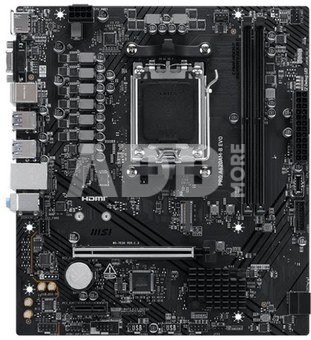
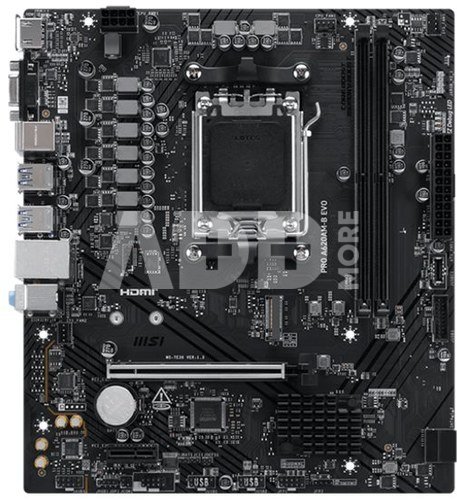
The PRO Series is tailored to professionals from all walks of life. The lineup features impressive performance and high quality, while aiming to provide users incredible experience. Users who care about productivity and efficiency can definitely count on the MSI PRO Series to assist you with multitasking and increasing efficiency.
Chipset Heatsink
The chipset heatsink is designed to reduce dust and noise and also capable of maintaining high efficiency of PCH.
CORE BOOST
Core Boost technology combines MSI's premium layout and optimized power design which allows for faster and undistorted current delivery to the CPU at pin-point precision. Not only supporting multi-core CPU, also creating the perfect conditions for your CPU overclocking.
REINFORCED,
HEAVY SOLDERED CONNECTIONS
MSI PCI Express Steel Armor slots are secured to the motherboard with extra solder points and support the weight of heavy graphics cards. When every advantage in games counts, Steel Armor shields the point of contact from electromagnetic interference.
FAST AND FUTURE-READY STORAGE
MSI PRO series motherboards support all the latest storage standards, which allows users to connect any ultra-fast storage device. Start games faster, load levels faster and have a real advantage over your enemies.
A larger BIOS ROM capacity allows users to enjoy the most complete and feature-rich BIOS interface when using their CPU. Even when upgrading to the latest AM5 CPUs in the future, full compatibility will still be ensured.
LATEST DDR5 MEMORY WITH SMT SLOT
A huge step of DDR performance enhancement with the latest DDR5 memory. Combines with dedicated SMT welding process and MSI Memory Boost technology, MSI PRO Series motherboards are ready to deliver the world class memory performance.
EASY OVERCLOCKING WITH EXPO PROFILE
MSI conducts thorough memory testing with the most popular memory brands under extreme conditions to ensure your system runs stable no matter what. Easy to enable EXPO profile with auto power settings to get the best memory speed and stability.
MSI BIOS has introduced the latest Latency Killer feature on all AM5 socket motherboards. Users can enable Latency Killer in the BIOS to reduce memory latency by up to 12% when running at high frequencies. Importantly, it is compatible with a wide range of memory overclocking features, including Memory Try It!!, EXPO, A-XMP, and High-Efficiency Mode, etc.
MSI brand new MSI Center unifies a suite of MSI software utilities into a single centralized application. Take control of advanced motherboards features and unleash endless possibilities.
Exclusive UI of AIDA64 Extreme
MSI motherboards provide 60 days free trial of AIDA64 Extreme - MSI edition. AIDA64 Extreme is an almighty application for system information, diagnostics and benchmarks. With the application, you can monitor the detailed hardware and software information on PC and save it to file in multiple formats such as CSV and HTML.
EXPO(EXTENDED PROFILES FOR OVERCLOCKING)
Choose from a preset EXPO profile and automatically overclock compatible DDR memory.
M-FLASH
Conveniently flash or upgrade the BIOS in a few minutes from the CMOS Setup Utility.
HARDWARE MONITOR
Get immediate access to your critical hardware information in real-time including temperature, memory capacity, clock speed, and voltage.
MEMORY TRY IT
Get extreme speed out of your system memory and get more performance.
SEARCH & FAVORITES
A permanent search & favorite option in the top right corner moves you through the BIOS menus quickly.
System Safety
All MSI PRO series motherboards have SECURITY function in BIOS to protect every private files for no matter business or daily use.
Resizable BAR (Re-Size BAR) is an advanced PCI Express feature that enables the CPU to access the entire GPU frame buffer at once and improve performance.
Garantinis laikotarpis
36 mėnesių
Svoris
0.85 kg
Pristatymo laikas
0-4 d.d.
Aptarkite su konsultantu Kaune
Neturime
Kaunas Adresas: Birželio 23-iosios g. 23g Darbo laikas: I-V 09:00 - 18:00 VI-VII nedirba Telefonas: +370 674 59488
Aptarkite su konsultantu Klaipėdoje
Neturime
Klaipėda Adresas: Taikos pr. 17 Darbo laikas: I-V 10:00 - 19:00 VI 10:00 - 14:00 VII nedirba Telefonas: +370 604 43972
1. Kaip pasirinkti tinkamą klaviatūrą ir pelę savo kompiuteriui?
Norint pasirinkti tinkamą klaviatūrą ir pelę savo kompiuteriui svarbu atsižvelgti į asmeninius poreikius ir naudojimo būdą. Klaviatūros pasirinkimas priklauso nuo jūsų darbo pobūdžio, ergonominių poreikių ir asmeninio komforto. Jei daug laiko praleidžiate rašydami, svarbu rinktis klaviatūrą su maloniu klavišų paspaudimu ir ergonomišku dizainu, kuris sumažina rankų ir pečių įtempimą. Specializuotos klaviatūros, kuriose yra papildomų funkcijų, pavyzdžiui, programuojamų klavišų arba spalvotų šviesų, gali pagerinti naudotojo patirtį. Pelės pasirinkimas gali priklausyti nuo jūsų darbo pobūdžio – grafikos dizaineriams arba žaidimų entuziastams gali reikėti aukštos raiškos ir didelio jautrumo pelės. Ergonominės pelės su daugiau nei vienu mygtuku gali palengvinti darbą su įvairiomis programomis. Be to, svarbu atkreipti dėmesį į sąveiką su jūsų kompiuterio tipu (ar tai belaidė, ar laidinė klaviatūra ir pelė) bei patogią ergonomiją. Prieš perkant, būtina išbandyti klaviatūrą ir pelę, kad įsitikintumėte, jog jos atitinka jūsų poreikius ir yra patogios naudoti.
2. Kokios yra geriausios aušinimo sistemos kompiuteriui?
Geriausią aušinimo sistemą galima pasirinkti atsižvelgiant į kompiuterio naudojimo scenarijų. Vandens aušinimas dažnai būna efektyvus, ypač esant dideliam apkrovimui, o oro aušinimas yra paprastesnis ir pigesnis variantas. Keletas populiarių aušinimo būdų apima: 1) Oro aušinimas (Air Cooling): Paprasta ir ekonominė alternatyva, naudojanti didelius ventiliatorius, šilumos vamzdžius ir radiatorius. Šis būdas tinka vidutinio ir žemo lygio naudotojams. 2) Vandens aušinimas (Liquid Cooling): Ši sistema naudoja specialų šilumos siurblių ir vamzdžių rinkinį, leidžiantį aušinti komponentus vandeniu. Tai dažnai naudojama su pažangesniais procesoriais ir vaizdo plokštėmis, tačiau reikalauja tikslaus diegimo. 3) Phase Change Cooling: Labai efektyvi sistema, kuri naudoja šaltus dujų ciklus, kad transformuotų dujas į skysčius ir atvirkščiai. Tai brangesnė alternatyva, bet suteikia itin efektyvų aušinimą. 4) Termoelektrinė (Peltier) sistema: Šio tipo sistema naudoja Peltier elementus, kurie gali perkelti šilumą iš vienos pusės į kitą, priklausomai nuo elektros srovės krypties. Ši sistema gali būti derinama su kitomis aušinimo metodikomis. Geriausią pasirinkimą lemia naudojimo atvejis, biudžetas ir pageidaujamas efektyvumas. Priklausomai nuo to, ar norite paprasto, bet patikimo oro aušinimo, ar pažangesnės technologijos su vandeniu, turite rinktis tai, kas geriausiai atitinka jūsų poreikius.
















Atsiliepimai
0 vidutinis įvertinimas (0 įvertinimų)